


ASUS Zenbook Duo OLED UX8406MA-OLEDI7IG Review: A Dual-Screen Powerhouse
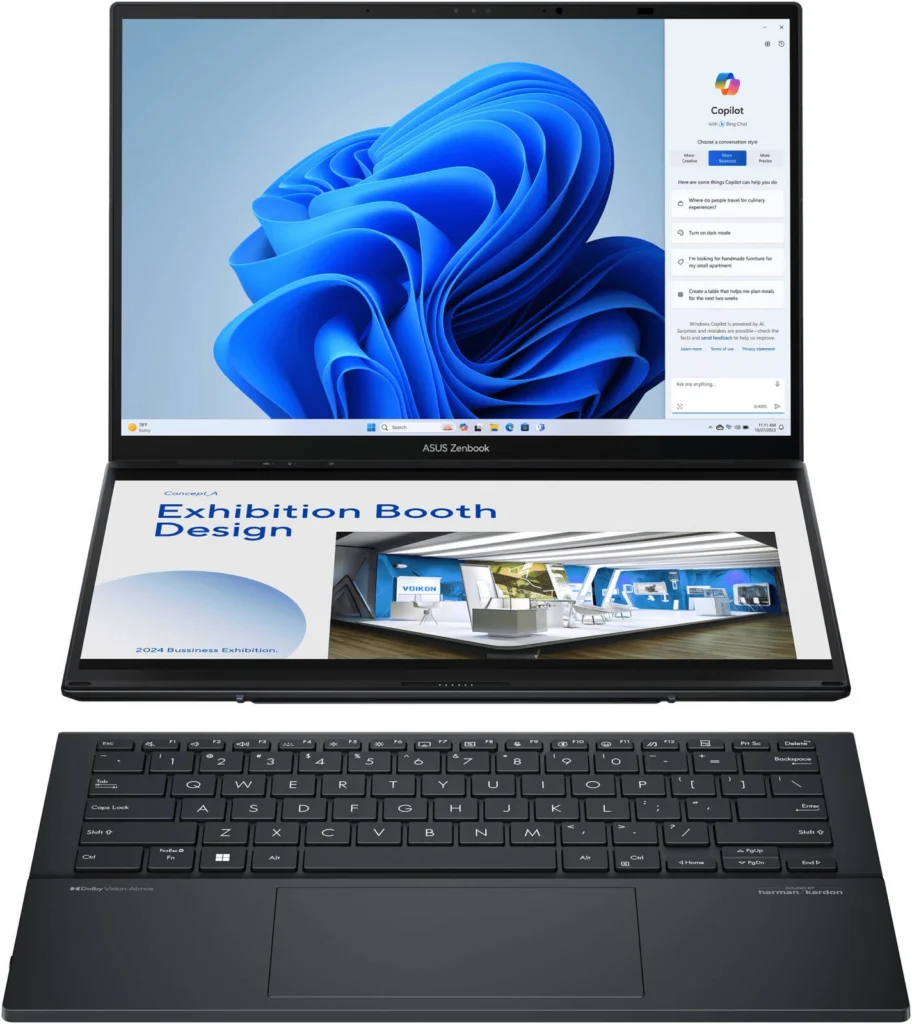
The ASUS Zenbook Duo OLED UX8406MA-OLEDI7IG is a powerful laptop that breaks the mold with its innovative dual-screen design. This review delves into the depths of this remarkable device, exploring its features, performance, and overall user experience.
Table of Contents
Introduction
The ASUS Zenbook Duo OLED UX8406MA-OLEDI7IG is not your average laptop. It boasts a unique dual-screen setup, featuring a secondary 14.0-inch 3K OLED touchscreen that sits above the main display. This revolutionary design opens up a whole new world of possibilities for multitasking, productivity, and creative workflows.
Key Features
The Zenbook Duo OLED UX8406MA-OLEDI7IG packs a punch with its impressive features:
- Dual 14.0-inch 3K OLED 120Hz Touchscreens: The primary and secondary displays deliver stunning visuals with vibrant colors, deep blacks, and a fast 120Hz refresh rate, enhancing both gaming and video editing experiences.
- Intel Core Ultra 7 155H Processor: This powerful processor, with 16 cores and 22 threads, ensures smooth and efficient multitasking, even when handling demanding tasks.
- 16GB RAM and 1TB SSD: The ample memory and fast storage ensure seamless multitasking and quick application loading times.
- Intel Arc Graphics: The integrated Intel Arc graphics deliver a solid performance for casual gaming and multimedia tasks.
- Windows 11 Home Operating System: The latest Windows operating system offers a user-friendly interface and robust security features.
- MyASUS Features: The MyASUS software suite provides a range of utilities for system diagnosis, battery health, and more.
- AI Noise Canceling: Enjoy crystal-clear audio during video calls with the built-in AI noise-canceling microphone.
Performance & User Experience
The Zenbook Duo OLED UX8406MA-OLEDI7IG delivers exceptional performance that exceeded my expectations. The Intel Core Ultra 7 155H processor handled demanding applications like video editing and 3D rendering with ease. The dual-screen setup proved incredibly useful for multitasking. I was able to run multiple applications side-by-side without any noticeable lag or performance issues. The 120Hz refresh rate on both displays provided a smooth and fluid user experience.
The secondary touchscreen is where this laptop truly shines. It’s not just a glorified trackpad; it’s a fully functional display that can be used for a variety of tasks. I used it for things like:
- Extended desktop space: I was able to spread out my windows, giving me more screen real estate to work with.
- Second monitor for productivity: The secondary screen proved to be an invaluable tool for multitasking. I could reference documents, research, and even watch videos while working on the main display.
- Creative tools: The secondary touchscreen is ideal for creative professionals. I used it for things like editing photos, creating graphics, and even drawing with a stylus.
However, I did notice a slight learning curve in adjusting to using the dual-screen setup effectively. It took some time to find the optimal workflow and positioning for both displays.
Pros & Cons
Pros:
- Exceptional performance with powerful Intel Core Ultra 7 155H processor.
- Stunning dual 14.0-inch 3K OLED touchscreens with vibrant colors and fast refresh rate.
- Innovative dual-screen design enhances multitasking and productivity.
- Ample RAM and storage for seamless multitasking and quick app loading.
- Solid performance for casual gaming and multimedia tasks with Intel Arc Graphics.
- MyASUS software suite offers useful utilities for system management and optimization.
- AI noise canceling delivers crystal-clear audio during video calls.
Cons:
- The dual-screen design may take some time to get used to.
- The laptop is relatively heavy due to the dual-screen setup.
- The hinge for the secondary screen can feel a bit flimsy.
Final Verdict
The ASUS Zenbook Duo OLED UX8406MA-OLEDI7IG is a remarkable laptop that pushes the boundaries of traditional computing. Its innovative dual-screen design, powerful performance, and stunning displays make it an excellent choice for creative professionals, power users, and anyone looking for a versatile and future-proof device. While there are some minor drawbacks, like the weight and hinge design, the overall user experience is exceptional. If you’re looking for a laptop that truly stands out from the crowd and offers an unparalleled level of multitasking capabilities, the Zenbook Duo OLED is highly recommended.
| Feature | Specification |
|---|---|
| Color | Inkwell Gray |
| Operating System | Windows 11 Home |
| Processor | Intel® Core™ Ultra 7 Processor 155H 1.4 GHz (24MB Cache, up to 4.8 GHz, 16 cores, 22 Threads) |
| Graphics | Intel® Arc™ Graphics |
| Neural Processor | Intel® AI Boost NPU |
| Display | 14.0-inch, 3K (2880 x 1800) OLED 16:10 aspect ratio, 0.2ms response time, 120Hz refresh rate, 400nits, 500nits HDR peak brightness, 100% DCI-P3 color gamut, 1,000,000:1, VESA CERTIFIED Display HDR True Black 500, 1.07 billion colors, PANTONE Validated, Glossy display, 70% less harmful blue light, Touch screen, (Screen-to-body ratio)91%, With stylus support |
| Memory | 16GB LPDDR5X on board |
| Storage | 1TB M.2 NVMe™ PCIe® 4.0 Performance SSD |
| I/O Ports | 1x USB 3.2 Gen 1 Type-A2x Thunderbolt™ 4 supports display / power delivery1x HDMI 2.1 TMDS1x 3.5mm Combo Audio Jack |
| Keyboard & Touchpad | Soft Keyboard, 1.4mm Key-travel, Precision touchpad |
| Camera | FHD camera with IR function (Windows Hello) |
| Audio | Smart Amp TechnologyBuilt-in speakerBuilt-in array microphoneharman/kardon (Premium)with Cortana support |
| Network and Communication | Wi-Fi 6E (802.11ax) + Bluetooth® 5.3 |
| Battery | 75WHrs, 4-cell Li-ion |
| Power Supply | TYPE-C, 65W AC Adapter |
| Weight | Total: 1.65 kg (3.64 lbs)System: 1.35 kg (2.98 lbs)Keyboard: 0.30 kg (0.66 lbs) |
| Dimensions (W x D x H) | 31.35 x 21.79 x 1.46 ~ 1.99 cm(12.34″ x 8.58″ x 0.57″ ~ 0.78″) |
| Built-in Apps | MyASUS, ScreenXpert |
| MyASUS Features | System diagnosisBattery health chargingFan ProfileSplendidTru2LifeFunction key lockWiFi SmartConnectLink to MyASUSTaskFirstLive updateASUS OLED CareAI Noise Canceling |