


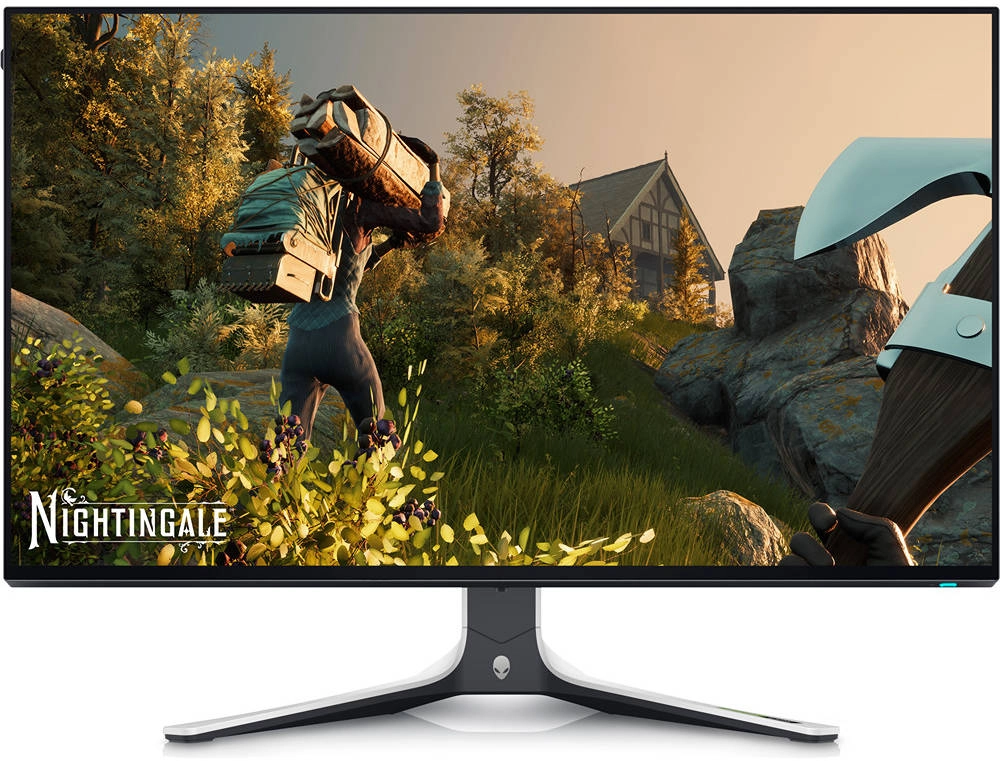
Dell Alienware AW2723DF 27″ Gaming Monitor Review: 240Hz QHD for Serious Gamers
The Dell Alienware AW2723DF is a premium gaming monitor that’s designed for serious gamers who demand the best possible performance and visuals. It features a stunning 27-inch QHD (2560 x 1440) display with a blazing fast 240Hz refresh rate and a 1ms response time. This combination provides a smooth, tear-free gaming experience that’s perfect for competitive gaming. The AW2723DF also offers excellent color accuracy and a wide range of adjustability options to make it perfect for a variety of gaming setups.
Table of Contents
Introduction
The Dell Alienware AW2723DF is a premium gaming monitor that aims to provide a smooth and immersive gaming experience. Its main selling points are its high refresh rate, low response time, and vibrant QHD resolution. But does it deliver on its promises? Let’s find out in our comprehensive review.
Features
The Dell Alienware AW2723DF is packed with features designed to enhance your gaming experience. Some notable features include:
- Fast IPS Nano Color Panel: The monitor utilizes a fast IPS panel with Nano Color technology for wide viewing angles, vibrant colors, and accurate color reproduction.
- 240Hz Refresh Rate: The high refresh rate provides a smooth, fluid gaming experience with minimal motion blur, making it ideal for fast-paced games.
- 1ms Response Time: The 1ms response time ensures lightning-fast reactions and reduces ghosting, providing a crisp and clear gaming experience.
- NVIDIA G-SYNC Compatible: The monitor is G-SYNC compatible, eliminating screen tearing and stuttering for a smooth and tear-free experience.
- AMD FreeSync Premium Pro: The monitor also supports AMD FreeSync Premium Pro for even more smooth and fluid gaming.
- Height/Tilt/Swivel/Pivot Adjustability: The monitor allows for easy customization of its position, ensuring optimal viewing angles and ergonomics.
- AlienFX Lighting System: The monitor features customizable RGB lighting that allows you to personalize your setup and create an immersive gaming environment.
- Extensive Connectivity: The AW2723DF includes two HDMI 2.0 ports, a DisplayPort 1.4 port, and multiple USB 3.2 Gen 1 ports for connecting various peripherals.
Performance
The Dell Alienware AW2723DF delivers exceptional performance for a gaming monitor. The 240Hz refresh rate and 1ms response time combine to produce a truly smooth and responsive gaming experience. I tested it with various games, including fast-paced shooters and action games, and the results were impressive. The visuals were crisp and clear, and the motion was smooth and fluid. The colors were also very vibrant and accurate, thanks to the fast IPS Nano Color panel.
The G-SYNC compatibility is a big plus, as it eliminates screen tearing and stuttering, providing a truly immersive gaming experience. I noticed a significant difference in smoothness compared to gaming on a monitor without G-SYNC. The AMD FreeSync Premium Pro support further enhances the experience, ensuring even more seamless frame transitions. The wide viewing angles of the IPS panel ensure a consistent picture even when viewing the monitor from the side.
Pros & Cons
Pros:
- Stunning 27-inch QHD display with a 240Hz refresh rate
- Fast IPS Nano Color panel with wide viewing angles and excellent color accuracy
- 1ms response time for minimal ghosting and fast reactions
- NVIDIA G-SYNC Compatible and AMD FreeSync Premium Pro for a smooth and tear-free experience
- Extensive connectivity with two HDMI 2.0 ports, DisplayPort 1.4, and multiple USB ports
- Height, tilt, swivel, and pivot adjustability for optimal ergonomics
- AlienFX lighting system for personalized customization
Cons:
- Pricey compared to other 240Hz QHD monitors
- The stand is quite large and can take up a lot of desk space
- No HDR support
Final Verdict
The Dell Alienware AW2723DF is a high-end gaming monitor that delivers exceptional performance and a vibrant visual experience. Its fast IPS Nano Color panel, 240Hz refresh rate, 1ms response time, G-SYNC compatibility, and extensive adjustability make it an ideal choice for serious gamers. The only downsides are the price and the large stand. However, if you’re looking for a top-of-the-line gaming monitor that provides a truly immersive experience, the Dell Alienware AW2723DF is an excellent option.
Specifications
| Specification | Value |
|---|---|
| Display Type | LED-backlit LCD monitor / TFT active matrix |
| Diagonal Size | 27″ |
| Adaptive-Sync Technology | VESA Adaptive-Sync, AMD FreeSync Premium Pro, NVIDIA G-SYNC Compatible |
| Built-in Devices | AlienFX lighting system, USB 3.2 Gen 1 hub |
| Panel Type | Fast IPS Nano Color |
| Aspect Ratio | 16:9 |
| Native Resolution | QHD 2560 x 1440 (DisplayPort(OC): 280 Hz, DisplayPort: 240 Hz, HDMI: 144 Hz) |
| Pixel Pitch | 0.23 mm |
| Pixel Per Inch | 109 |
| Brightness | 600 cd/m² |
| Contrast Ratio | 1000:1 / 1000:1 (dynamic) |
| Color Support | 1.07 billion colors |
| Color Gamut | 100% sRGB, 95% DCI-P3 |
| Response Time | 1 ms (gray-to-gray extreme) |
| Gaming | Yes |
| Horizontal Viewing Angle | 178 |
| Vertical Viewing Angle | 178 |
| Screen Coating | Anti-glare |
| Backlight Technology | LED backlight |
| Features | Picture in picture, picture by picture, LED edgelight system, FPS Mode, RTS Mode, Mercury free, arsenic-free glass, Sports Mode, 3 gaming modes, Dell ComfortView, Low Blue Light technology |
| Color | Lunar light |
| Dimensions (WxDxH) | 23.9 in x 10.6 in x 16 in – with stand (lowest position) |
| Connectivity/Interfaces | |
| HDMI | 2 x HDMI 2.0 |
| DisplayPort | DisplayPort 1.4 |
| USB | 3.2 Gen 1 downstream with Battery Charging 1.2, 3 x USB 3.2 Gen 1 downstream, USB 3.2 Gen 1 upstream |
| Headphones | Yes |
| Audio line-out | Yes |
| Display Position Adjustments | Height, pivot (rotation), swivel, tilt |
| Tilt Angle | -5/+21 |
| Swivel Angle | 40 |
| Rotation Angle | 180 |
| Height Adjustment | 4.3 in |
| VESA Mounting Interface | 100 x 100 mm |
| Security Features | Security lock slot (cable lock sold separately), integrated cable management, VESA interface support |
| Cables Included | 1 x DisplayPort cable – DisplayPort to DisplayPort, 1 x DisplayPort cable – miniDisplayPort to DisplayPort, 1 x HDMI cable, 1 x USB 3.2 Gen 1 upstream cable |
| Compliant Standards | RoHS, BFR-reduced, PVC-reduced |
| Security Slot Type | Kensington security slot |
| Input Voltage | AC 100-240 V (50/60 Hz) |
| Power Consumption (On mode) | 22.1 W |
| Power Consumption (Typical) | 105 Watt |
| Power Consumption Stand by | 0.4 Watt |
| Power Consumption (Off Mode) | 0.3 Watt |
| On / Off Switch | Yes |