


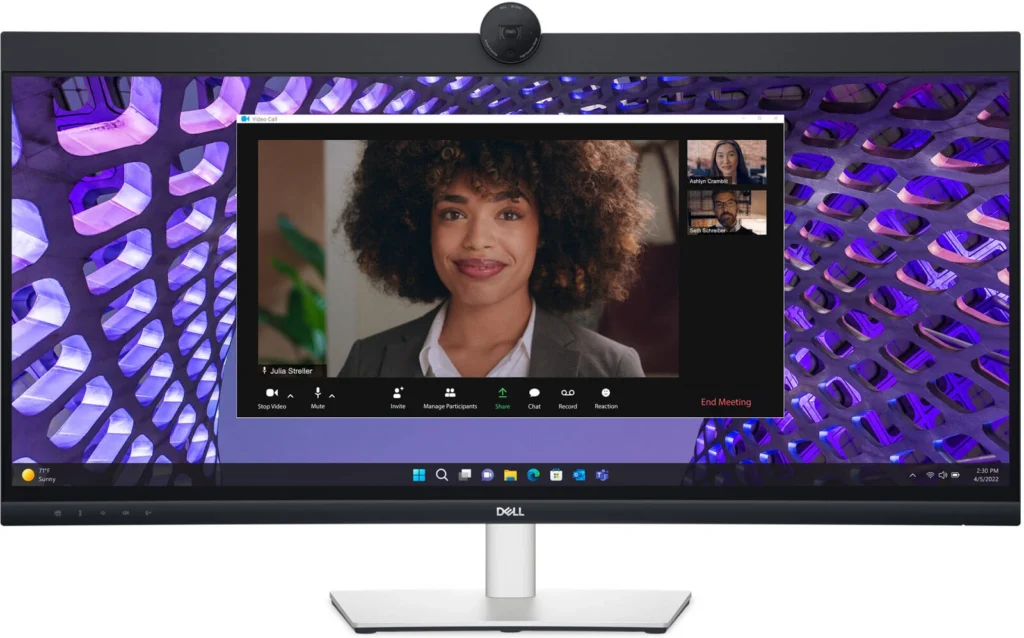
Dell P3424WEB Curved Conferencing Monitor Review
Table of Contents
Introduction
The Dell P3424WEB Curved Conferencing Monitor is a 34-inch ultrawide display designed to enhance your video conferencing experience. With its sleek design, built-in camera and speakers, and advanced features, it promises to be a versatile option for both professionals and home users. In this review, we’ll delve into the features, performance, and overall value of this impressive monitor.
Features
The Dell P3424WEB comes packed with features that make it a compelling choice for those looking for an all-in-one conferencing solution. Let’s break down some of the key highlights:
- Curved 34-inch WQHD Display: The 34-inch curved display with a 21:9 aspect ratio provides an immersive viewing experience, making it ideal for multitasking and productivity.
- Built-in 4MP Camera: The integrated 4MP camera offers high-quality video conferencing capabilities, ensuring clear and crisp visuals for meetings and video calls.
- Dual 5W Speakers: The built-in speakers deliver decent audio quality, providing a convenient option for conference calls and multimedia playback.
- Dell ComfortView Plus: This technology helps reduce harmful blue light emissions, reducing eye strain during extended use.
- Dell Easy Arrange: This feature allows you to easily organize your windows on the screen, maximizing productivity and efficiency.
- Height, Swivel, and Tilt Adjustments: The monitor offers a range of adjustments to ensure optimal viewing comfort and ergonomic positioning.
Performance
The Dell P3424WEB delivers solid performance across the board. The WQHD resolution offers sharp and detailed images, making it suitable for both professional and entertainment purposes. The 60Hz refresh rate ensures smooth visuals for everyday tasks and light gaming.
The built-in camera captures clear images and videos, providing a reliable experience for video conferencing. While the audio quality from the integrated speakers is not exceptional, it is adequate for basic conferencing needs.
However, the monitor’s lack of a higher refresh rate may be a drawback for gamers seeking a more immersive gaming experience.
Pros & Cons
- Immersive curved 34-inch WQHD display
- Built-in 4MP camera with clear video quality
- Dual 5W speakers for convenient audio output
- Dell ComfortView Plus for reduced eye strain
- Dell Easy Arrange for efficient multitasking
- Height, swivel, and tilt adjustments for ergonomic comfort
- USB Power Delivery for convenient charging
Pros:
- 60Hz refresh rate may not be ideal for gamers
- Average audio quality from built-in speakers
- Relatively high price compared to similar monitors
Cons:
Final Verdict
The Dell P3424WEB Curved Conferencing Monitor is a strong contender for those seeking a versatile and feature-rich display for both productivity and video conferencing. Its immersive curved screen, high-quality camera, and convenient features make it a compelling option.
However, its lack of a higher refresh rate and relatively high price might make it less appealing to gamers or budget-conscious users. Overall, the Dell P3424WEB is a solid choice for professionals and home users looking for a high-quality conferencing monitor with a touch of elegance.
| Specification | Value |
|---|---|
| Display Type | LED-backlit LCD monitor / TFT active matrix |
| Diagonal Size | 34″ |
| Viewable Size | 34.14″ |
| Curved Screen | Yes (3800R) |
| Built-in Devices | USB 3.2 Gen 1 hub, KVM ports |
| USB Power Delivery | 90 Watt |
| Panel Type | IPS |
| Aspect Ratio | 21:09 |
| Native Resolution | WQHD 3440 x 1440 at 60 Hz |
| Pixel Pitch | 0.2325 mm x 0.2325 mm |
| Pixel Per Inch | 109.68 |
| Brightness | 300 cd/m2 |
| Contrast Ratio | 1000:1 / 1000:1 (dynamic) |
| Color Support | 1.07 billion colors |
| Color Gamut | 99% sRGB |
| Response Time | 5 ms (gray-to-gray fast), 8 ms (gray-to-gray normal) |
| Horizontal Viewing Angle | 178° |
| Vertical Viewing Angle | 178° |
| Screen Coating | Anti-glare treatment of front polarizer (3H) hard-coating |
| Backlight Technology | LED |
| Features | Dell Easy Arrange, Low Blue Light technology, 3-sided bezel-less, Dell ComfortView Plus, flicker-free panel |
| Dimensions (WxDxH) | 32.11″ x 9.55″ x 17.55″ |
| Weight | 23.9 lbs |
| Interfaces | 1x HDMI (HDCP 2.2) |
| Display Position Adjustments | Height, swivel, tilt |
| Tilt Angle | -5°/+21° |
| Swivel Angle | -30°/+30° |
| Height Adjustment | 5.9 in |
| VESA Mounting Interface | 100 x 100 mm |
| Features | Security lock slot (cable lock sold separately), VESA interface support,1x 4MP RGB + IR 2K camera at 30 fps (FHD at 60 fps), 2x digital microphone, 2x 5W built-in speaker |
| Included Accessories | Monitor panel, Stand riser, Stand base, Quick setup guide, Safety, Environmental, and Regulatory Information |
| Cables Included | 1x Power cable |
| Compliant Standards | RoHS, TCO Certified 9.0, TCO Certified Edge |
| Security Slot Type | Kensington security slot |
| Input Voltage | AC 100-240 V (50/60 Hz) |
| Power Consumption (On mode) | 31.5 W |
| Power Consumption (Max) | 210 Watt |
| Power Consumption Standby | 0.3 Watt |
| Power Consumption (Off Mode) | 0.3 Watt |
| On/Off Switch | Yes |
| Included Software | Dell Display Manager, Dell Power Button Sync (DPBS) |
| EPEAT Compliant | EPEAT Gold |
| ENERGY STAR Certified | Yes |
| Min Operating Temperature | 32 °F |
| Max Operating Temperature | 104 °F |
| Humidity Range Operating | 20 – 80% (non-condensing) |
| Physical Characteristics | Dimensions & Weight Details |