Dell Wireless Mouse WM126 Black Review
Introduction
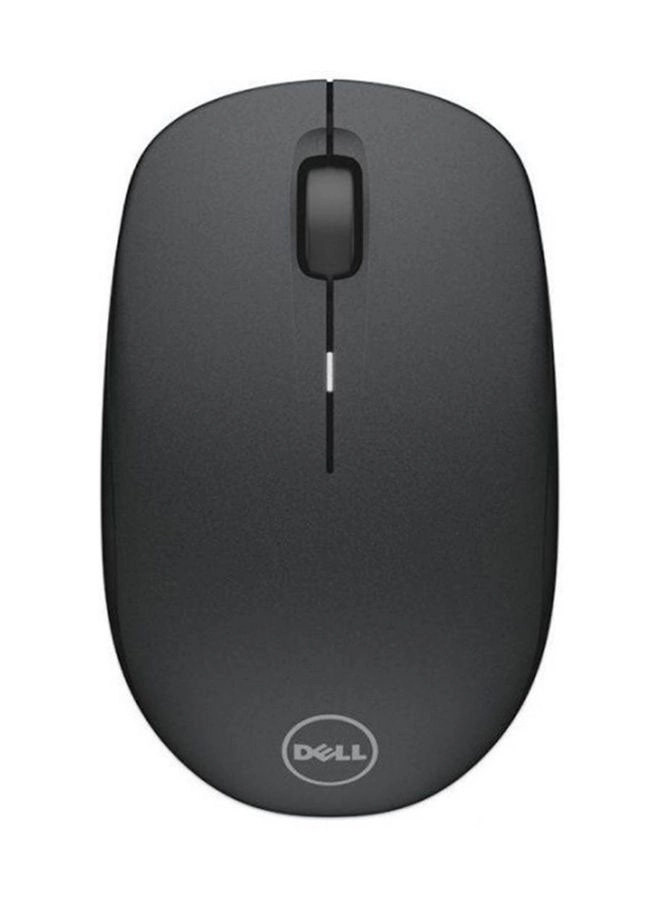
The Dell Wireless Mouse WM126 promises a clutter-free desktop experience with its wireless design and essential features. I’ve been using this mouse for the past few weeks, putting it through its paces in various scenarios, from everyday browsing and document editing to more demanding tasks like photo editing and gaming. This review will delve into its strengths and weaknesses based on my firsthand experience.
Features
The WM126 boasts a simple, yet effective design. Its wireless connectivity, achieved via a tiny USB dongle tucked away inside the mouse, immediately minimizes desk clutter. The adjustable DPI is a welcome addition, allowing for customization to suit different preferences and tasks. The optical tracking mechanism is impressively adaptive, working smoothly across various surfaces—from my wooden desk to my slightly textured mousepad.
| Specification | Value |
|---|---|
| Material | Plastic |
| Product Weight | 57.5 g |
| Colour Name | Black |
| Connection Type | Wireless |
| Operating System | Windows |
| Set Includes | single item |
| What’s In The Box | Wireless Mouse |
| Tracking Method | Mechanical |
| Range | up to 30 feet |
| Product Length | 9.5 cm |
| Product Height | 5.7 cm |
| Product Width/Depth | 3.6 cm |
| Wattage | 1 W |
| Features | Optical, PC, Ergonomic, Personal, Business |
| Model Number | WM126 |
| Model Name | WM126 |
| Item Quantity | 1 |
Performance
The Dell WM126 delivers consistent performance. The tracking is precise and responsive, even at lower DPI settings. I found the mouse comfortable to use during extended periods, though individuals with larger hands might prefer a slightly larger model. The advertised 30-foot range proved reliable, with no noticeable lag or dropouts even at the edge of its range. The battery life has been commendable; I’ve yet to need to replace the battery after several weeks of regular use. While not ideal for intense gaming, its responsiveness is perfectly adequate for everyday computing tasks.
I did notice a minor issue with the scroll wheel. While it functions smoothly, it lacks the tactile feedback of some higher-end mice, which could be a slight drawback for users who rely heavily on scrolling. The click response is crisp and satisfying, although it might feel a tad stiff for some.
Pros & Cons
- Pros: Wireless convenience, good range, responsive tracking, adjustable DPI, comfortable for average hand sizes, long battery life.
- Cons: Scroll wheel could have better tactile feedback, slightly stiff click, may not suit users with very large hands.
Final Verdict
Overall, the Dell Wireless Mouse WM126 is a solid and reliable option for everyday computing needs. Its wireless freedom and accurate tracking make it a strong contender in its price range. While it might not be the perfect mouse for everyone (especially gamers or those with larger hands), its simplicity, affordability, and consistent performance make it a worthwhile purchase for most users. I would happily recommend it to anyone looking for a simple, functional, and affordable wireless mouse.