


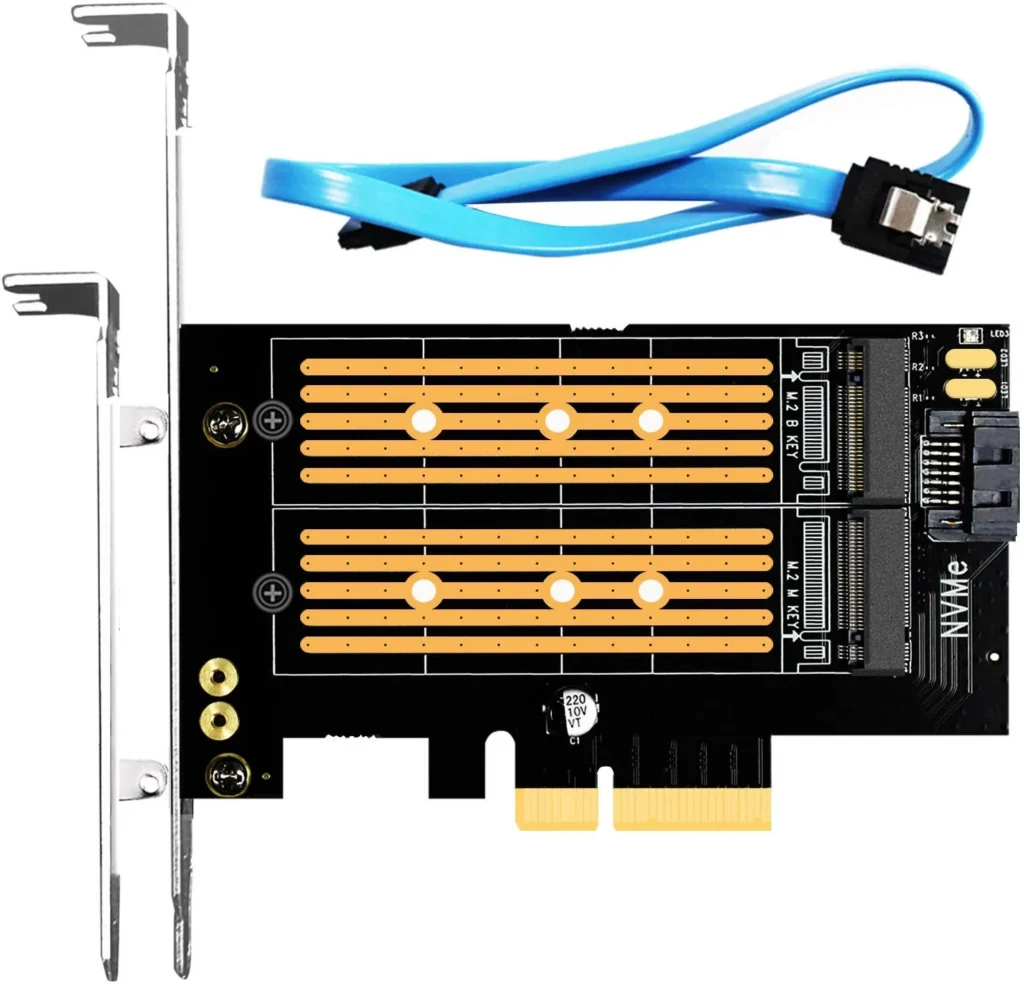
GLOTRENDS 2-in-1 M.2 PCIe 4.0 Adapter (PA12) Review: A Versatile Upgrade for Your PC
The GLOTRENDS 2-in-1 M.2 PCIe 4.0 Adapter (PA12) is a handy tool for PC builders who need to add M.2 SSD storage to their system. This adapter allows you to connect both M.2 PCIE (NVME/AHCI) and M.2 NGFF SATA SSDs to a PCIe 3.0 motherboard, offering flexibility and expanding your storage options. In this review, we’ll explore its features, performance, and overall value.
Table of Contents
Introduction
The GLOTRENDS 2-in-1 M.2 PCIe 4.0 Adapter (PA12) is designed to bridge the gap between M.2 SSDs and PCIe 3.0 motherboards. It allows you to utilize modern M.2 SSDs, including those with PCIe 4.0 speeds, on older systems with PCIe 3.0 slots. This adapter boasts a sleek black design and includes both a regular and low profile bracket, catering to various PC case configurations.
Key Features
The GLOTRENDS 2-in-1 M.2 PCIe 4.0 Adapter (PA12) is packed with features that make it a versatile storage solution:
- Supports both M.2 PCIE (NVME/AHCI) and M.2 NGFF SATA SSDs: This adapter offers the flexibility to connect a wide range of SSDs, allowing you to choose the type that best suits your needs and budget.
- PCIe 4.0 compatible: While the adapter itself connects to a PCIe 3.0 slot, it supports PCIe 4.0 SSDs. This ensures that you can utilize the full potential of your chosen SSD, even on older systems.
- Supports PCIe 3.0 X4/X8/X16 Lane Installation: This adapter is compatible with various PCIe configurations, providing installation flexibility. It can be used with PCIe 3.0 slots with 4, 8, or 16 lanes, providing a solid connection regardless of your motherboard’s configuration.
- Regular and low profile bracket included: The adapter comes with both regular and low profile brackets, ensuring compatibility with standard ITX cases, mini ITX cases, and even 2U servers. This versatility makes it a suitable choice for a wide range of PC builds.
- Extensive OS Compatibility: The adapter is compatible with Windows 10/8, Windows Server 2012 R2, Linux distributions (Fedora, SUSE, Ubuntu, Red Hat), and more. This ensures broad compatibility with various operating systems.
Performance Analysis
The GLOTRENDS 2-in-1 M.2 PCIe 4.0 Adapter (PA12) delivers solid performance, particularly for those who utilize PCIe 3.0 SSDs. However, it is important to note that while the adapter supports PCIe 4.0 SSDs, the actual speeds you achieve will be limited by the PCIe 3.0 interface of the motherboard. This means that you won’t experience the full potential of PCIe 4.0 SSDs when using this adapter with a PCIe 3.0 motherboard. Nevertheless, the adapter still delivers significant performance improvements compared to traditional SATA SSDs.
Pros & Cons
Here’s a breakdown of the advantages and disadvantages of the GLOTRENDS 2-in-1 M.2 PCIe 4.0 Adapter (PA12):
Pros
- Versatility: Supports both M.2 PCIE (NVME/AHCI) and M.2 NGFF SATA SSDs, making it compatible with a wide range of storage options.
- PCIe 4.0 compatibility: Supports PCIe 4.0 SSDs, allowing you to utilize the full potential of your SSD, even on older systems with PCIe 3.0 slots.
- Reliable performance: Delivers solid performance, particularly with PCIe 3.0 SSDs, offering a significant upgrade over traditional SATA SSDs.
- Flexibility: Supports PCIe 3.0 X4/X8/X16 Lane Installation, compatible with various PCIe configurations.
- Included brackets: Comes with both regular and low profile brackets for compatibility with different PC cases.
- Wide OS compatibility: Compatible with Windows, Linux, and other operating systems, ensuring broad usability.
Cons
- Limited by PCIe 3.0: While supporting PCIe 4.0 SSDs, the adapter’s performance is limited by the PCIe 3.0 interface of the motherboard.
- No heatsink: The adapter does not include a heatsink, which can be a concern for high-performance SSDs that generate heat.
Final Verdict
The GLOTRENDS 2-in-1 M.2 PCIe 4.0 Adapter (PA12) is a solid option for PC builders looking to add M.2 SSD storage to their system. Its versatility, compatibility with PCIe 4.0 SSDs, and reliable performance make it a valuable upgrade. However, it’s crucial to understand that its performance is limited by the PCIe 3.0 interface of the motherboard. For those with older systems and looking for an affordable way to upgrade to M.2 SSDs, this adapter is a good choice. If you’re building a high-end system with a PCIe 4.0 motherboard, you might want to consider a dedicated PCIe 4.0 adapter.
Specifications
| Feature | Value |
|---|---|
| Internal Interface | PCI-E x4 + SATA III |
| External Interface | Key M for PCI-E InterfaceKey B for SATA III Port |
| Max Bandwidth | 64Gbps for PCle 4.06Gbps for NGFF SATA |
| M.2 Protocol | PCI-E 4.0/3.0/2.0SATA III/II/I |
| M.2 Compatibility | PCIE NVMe/AHCI SSDNGFF SATA SSD |
| Groove Heatsink | None |
| Profile Bracket | Regular Profile Bracket for Standard ITX CaseLow Profile Bracket for Mini ITX Case/2U Server |
| OS Compatibility | Windows 10/8, Windows Server 2012 R2Linux, Fedora, SUSE, Ubuntu, Red Hat |
| Driver Required | Windows 7, Windows Server 2008 R2 |