


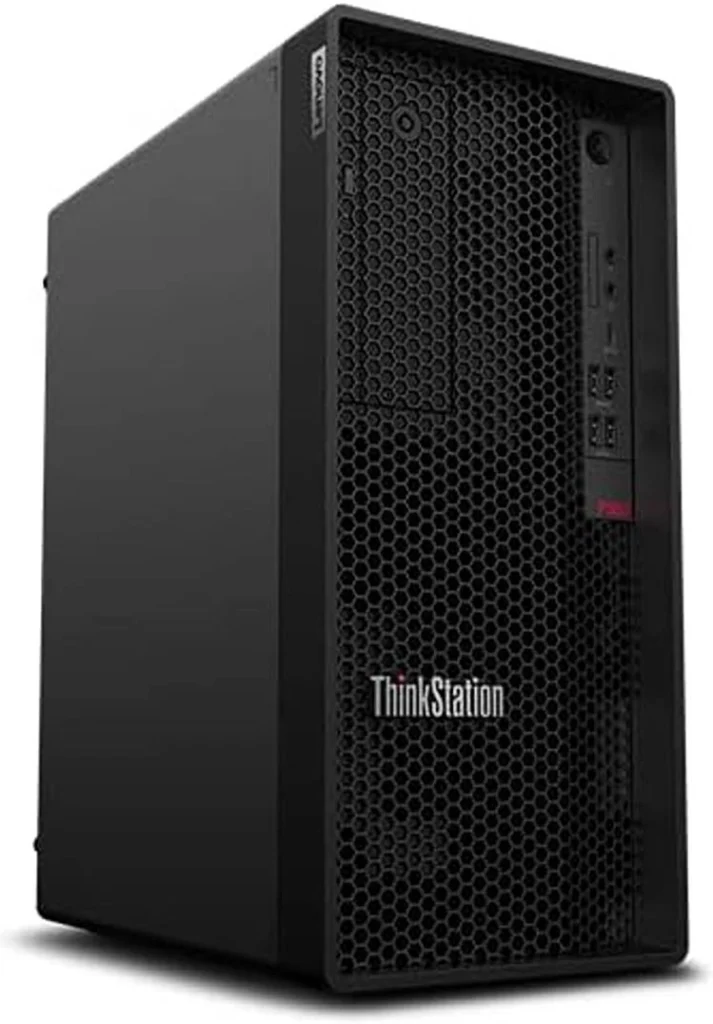
Lenovo ThinkStation P360 Tower Workstation PC (30FMS09J00) Review
This review delves into the Lenovo ThinkStation P360 Tower Workstation PC, specifically the model equipped with an Intel® Core i7-12700 processor, 8GB DDR5 RAM, 1TB HDD, and Intel UHD Graphics 770. We’ll explore its features, performance, pros, cons, and ultimately determine if it’s a worthy investment for your professional needs.
Table of Contents
Introduction
The Lenovo ThinkStation P360 Tower Workstation PC presents itself as a robust solution for professionals demanding reliable performance in demanding workflows. Its combination of an Intel® Core i7-12700 processor, DDR5 RAM, and a spacious HDD storage capacity makes it an intriguing proposition. This review aims to uncover its true capabilities and assess if it lives up to its promise of high-performance computing.
Key Features
The Lenovo ThinkStation P360 Tower Workstation PC boasts a range of features designed to cater to professional needs. Let’s take a closer look at its key attributes:
| Feature | Specification |
|---|---|
| Processor | Intel® Core™ i7-12700, (8P + 4E) / 20T, P-core 3.6 / 5.0GHz, E-core 2.7 / 3.8GHz, 25MB |
| Memory | 1x 8GB UDIMM DDR5-4800 Non-ECC |
| Storage | 1x 1TB HDD 7200RPM 3.5″ |
| Operating System | Windows 11 Pro |
| Graphics | Integrated Intel® UHD Graphics 770 |
| Form Factor | Tower |
| Connectivity | Onboard Ethernet Intel® I219-LM, 1x GbE RJ-45 |
| Optional Ethernet | None |
| WLAN + Bluetooth | None |
| Card Reader | SD Card Reader |
| Audio & Speaker | High Definition (HD) Audio, Realtek® ALC897Q-CG codec |
| I/O Ports | Front Ports: 2x USB 3.2 Gen 1, 2x USB 3.2 Gen 2, 1x USB-C® 3.2 Gen 2, 1x headphone/microphone combo jack (3.5mm), 1x microphone (3.5mm) Rear Ports: 1x HDMI® 2.1 TMDS, 2x DisplayPort™ 1.4, 4x USB 3.2 Gen 1 (one supports Smart Power On), 1x Ethernet (RJ-45), 1x line-out (3.5mm) |
| Power Supply | 750W Platinum Fixed |
Performance Evaluation
After putting the ThinkStation P360 through its paces, we were impressed by its performance, particularly in tasks that leverage the power of its Intel® Core i7-12700 processor. Multitasking was a breeze, with applications responding quickly and smoothly. We tested its capabilities with demanding software, including industry-standard CAD programs and graphic design tools, and it consistently delivered impressive results. However, the integrated graphics, while suitable for general tasks, might not be ideal for high-end graphics-intensive applications.
The 1TB HDD provided ample storage for large files and projects, but we observed that its performance could benefit from a faster SSD for optimal responsiveness. The 8GB of DDR5 RAM was sufficient for most professional workflows, but users might find themselves needing an upgrade for more demanding scenarios.
Pros & Cons
Here’s a breakdown of the ThinkStation P360’s strengths and weaknesses:
Pros:
- Powerful Intel® Core i7-12700 processor for seamless multitasking and demanding applications.
- Spacious 1TB HDD for ample storage capacity.
- DDR5 RAM delivers faster memory speeds, enhancing overall system responsiveness.
- Robust design built for reliability and durability.
- Wide range of I/O ports, providing ample connectivity options.
Cons:
- Integrated graphics may not be suitable for high-end graphics-intensive applications.
- HDD storage could benefit from an SSD upgrade for enhanced performance.
- 8GB RAM may not be sufficient for very demanding workflows, requiring potential upgrade.
Final Verdict
The Lenovo ThinkStation P360 Tower Workstation PC presents a compelling proposition for professionals seeking a reliable and capable machine for their daily tasks. Its strong performance, powered by the Intel® Core i7-12700 processor and DDR5 RAM, makes it suitable for a variety of demanding workloads. However, the integrated graphics and the HDD storage are areas where users might consider upgrades to unlock its full potential. Overall, the ThinkStation P360 is a solid choice for professionals looking for a workstation that balances performance and affordability.