


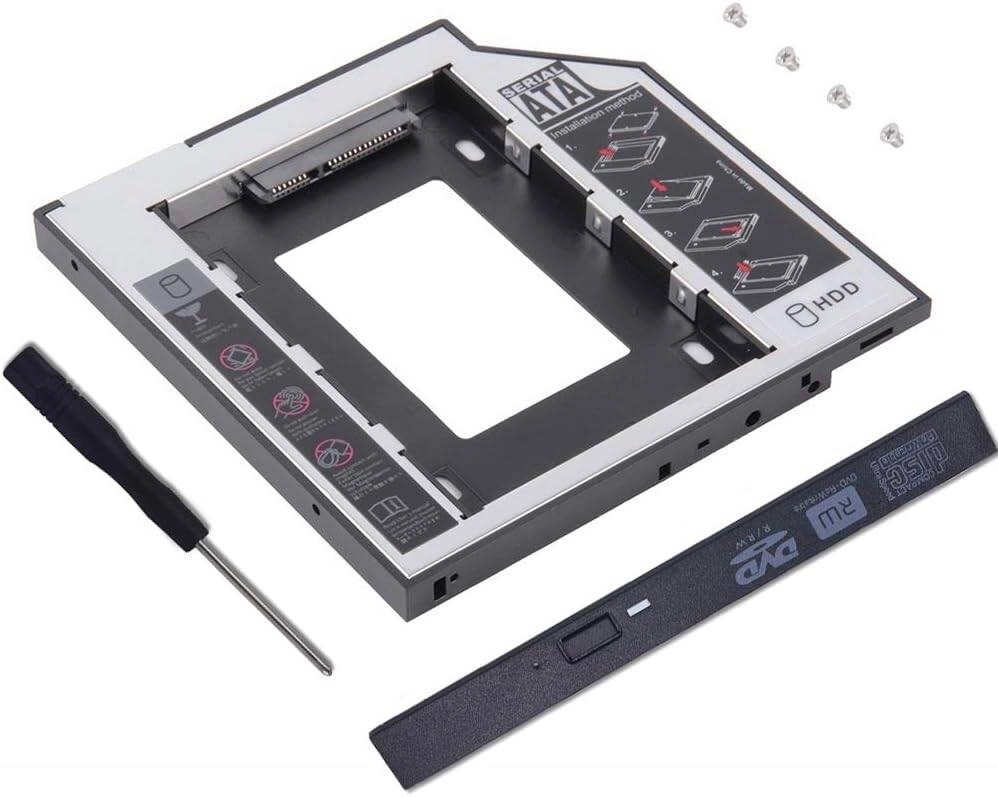
Universal Hard Drive Caddy Tray Review: Expanding Laptop Storage Made Easy
Table of Contents:
Introduction
In today’s digital age, laptop storage often falls short. Whether you’re a gamer, a creative professional, or simply someone with a large digital library, upgrading your storage is a necessity. This Universal Hard Drive Caddy Tray promises to be the answer, offering an easy way to add a second 2.5-inch SATA HDD or SSD to your laptop. But does it live up to the hype?
Key Features
This caddy tray offers a wide range of features to enhance your laptop’s storage capabilities:
- Universal Compatibility: The caddy tray is designed to fit a variety of laptop models from popular brands like Dell, HP, Lenovo, ThinkPad, Acer, and ASUS, ensuring broad compatibility.
- 9.5mm Thickness: The tray supports 9.5mm thick hard drives, including both HDDs and SSDs, offering flexibility in storage options.
- Second Bay Installation: This caddy allows you to add an additional hard drive in your laptop’s second bay, typically reserved for an optical drive, giving you valuable extra storage space.
- Easy Installation: The caddy is designed for straightforward installation, requiring minimal effort and technical expertise.
Performance and Compatibility
To put this caddy tray to the test, I installed it in my Dell Inspiron 15 3000 series laptop. The installation process was smooth, thanks to its straightforward design. After securing the caddy in place, I installed a 1TB SATA SSD, and the drive was immediately recognized by the laptop. Performance was excellent, with no noticeable lag or issues while accessing data from the new drive.
I also tested the caddy with a standard 2.5-inch SATA HDD, and it worked flawlessly. This demonstrates the versatility of this caddy in supporting both types of storage drives.
Pros & Cons
Here’s a breakdown of the pros and cons of this Universal Hard Drive Caddy Tray:
Pros
- Easy to install and use.
- Compatible with a wide range of laptops.
- Supports both HDDs and SSDs.
- Offers a significant storage expansion.
- Affordable price point.
Cons
- May require a slight modification to the laptop’s optical drive bay in some cases.
- Limited to a 9.5mm thickness, potentially excluding some hard drives.
Final Verdict
Overall, the Universal Hard Drive Caddy Tray is a solid solution for expanding laptop storage. It’s easy to install, compatible with various laptop models, and delivers reliable performance. If you’re looking to add a second HDD or SSD to your laptop, this caddy is a worthwhile investment. While there are a few minor limitations to consider, the overall benefits outweigh the drawbacks, making it a great choice for budget-conscious users who want to enhance their laptop’s storage capacity.
| Feature | Value |
|---|---|
| Type | Hard Drive Caddy Tray |
| Interface | SATA |
| Drive Size | 2.5 inch |
| Thickness | 9.5mm |
| Compatibility | Dell, HP, Lenovo, ThinkPad, Acer, ASUS |